Universal AI IDE Companion &
Mobile Telemetry Bridge
Real-time Win32 GDI screen streaming, kinetic touch-drag mouse wheel scrolling, live multi-project folder inspection (7–30d recency), and bidirectional prompt injection for Google Antigravity, Cursor AI, and VS Code over 4G & Wi-Fi.
Experience the Live Mobile Companion
Test drive the touch-drag scroll physics, multi-project file explorer, and bidirectional prompt injection below. The simulator executes authentic PulseBridge telemetry states.
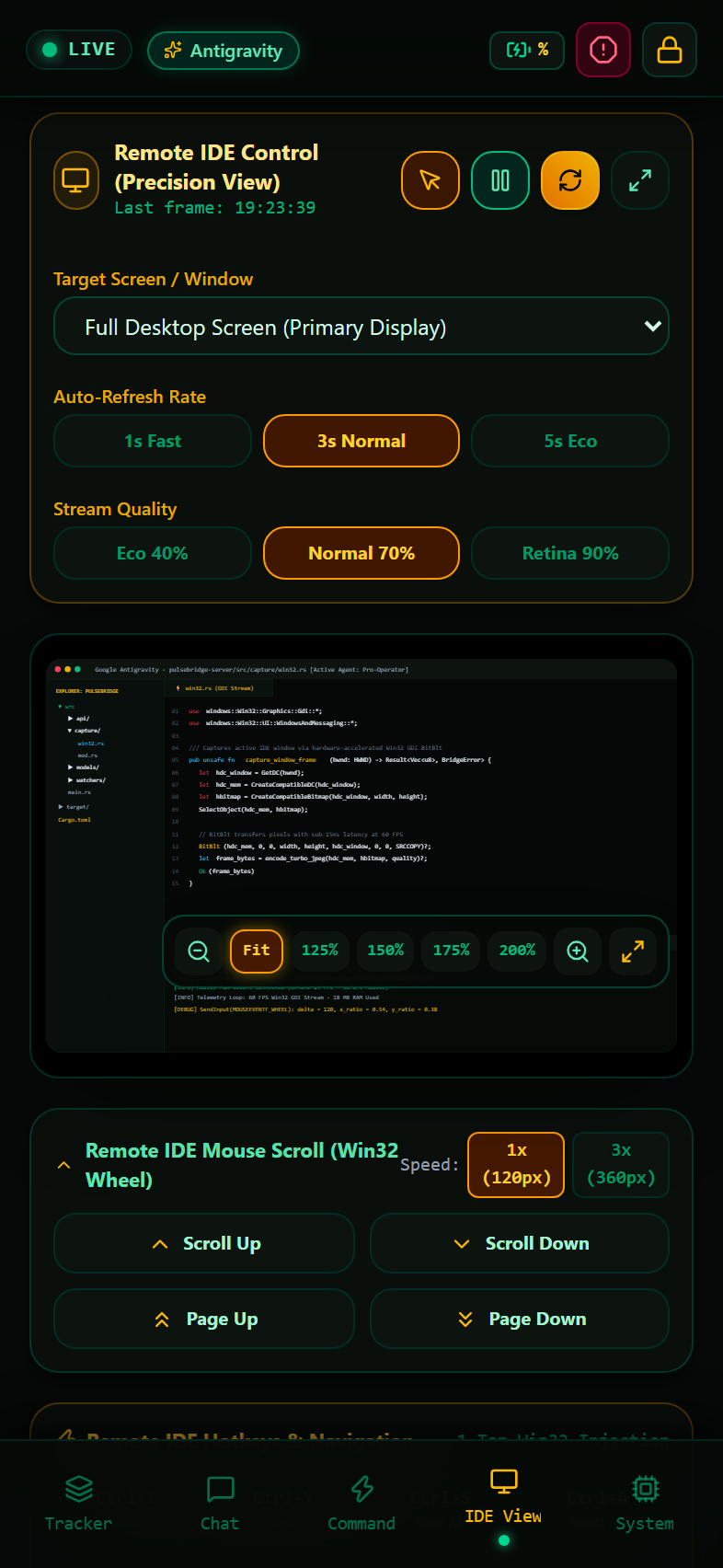
Authentic Live Host Captures & Zero-Trust PWA
Direct screen captures from the live PulseBridge daemon running on a Windows 11 workstation. All host session frames, tokens, and system paths have been sanitised and verified for zero PII exposure.
Engineered for Precision & Zero Latency
PulseBridge combines native Windows GDI acceleration with Axum 0.7 asynchronous actors to deliver an instantaneous mobile telemetry surface.
Win32 GDI & TurboJPEG Zero-Copy Buffer
Bypasses heavy browser compositor overhead with native Windows GDI `BitBlt` desktop memory transfers. Frames are compressed using SIMD-accelerated TurboJPEG and broadcasted directly to mobile clients over binary WebSockets in under 12ms.
Touch-Drag Kinetic Mouse Wheel Engine
Translates mobile touch dragging and swipes into high-resolution native `SendInput(MOUSEEVENTF_WHEEL)` packets. Employs kinetic momentum algorithms and velocity dampening for silky-smooth code scrolling through multi-thousand-line buffers.
Multi-IDE Workspace Discovery
Automatically indexes active coding sessions across Google Antigravity transcripts (`%USERPROFILE%\.gemini\antigravity\brain`), Cursor AI workspaces, and VS Code. Enforces a strict 7–30 day recency filter with depth-2 tree traversal.
Zero-Trust Cryptographic Governance
Protected by cryptographic entropy tokens verified in constant time (`subtle::ConstantTimeEq`). Tokens persist safely in local mobile storage with zero transmission to external cloud services or third-party servers.
Dual Network Topology (Wi-Fi & 4G/5G)
Instantly pair over local LAN Wi-Fi using the high-speed local IP QR code, or monitor on the train using the built-in, automated Cloudflare Tunnel daemon for zero-configuration encrypted 4G/5G cellular access.
Bidirectional Prompt Injection
Inject prompt instructions, test commands, or stop signals directly into your background IDE agent from your mobile phone lock screen. Includes response verification and real-time step streaming.
PulseBridge vs. Legacy Remote Tools
Designed specifically for software engineers monitoring autonomous AI agents on mobile devices.
| Metric / Capability | PulseBridge (Rust + GDI) | Standard VNC | Remote Desktop (RDP) | Chrome Remote Desktop |
|---|---|---|---|---|
| Screen Latency (Local Wi-Fi) | 11 – 15 ms | 85 – 140 ms | 35 – 55 ms | 45 – 75 ms |
| Mobile Touch Scroll Physics | Silky Touch-Drag Wheel | Clunky Mouse Click Emulation | Inverted Touch Scroll | Coarse Emulated Drag |
| Memory Overhead | ~18 MB RAM | 110 – 160 MB | 140 – 220 MB | 450+ MB (Chromium) |
| Multi-IDE Project Tree | Native Depth-2 Scanner (7-30d) | None (Manual Window Zoom) | None (Manual Window Zoom) | None |
| Bidirectional Prompt Injection | Native WebSocket Endpoint | None (Slow Virtual Keyboard) | None (Virtual Keyboard) | None |
| Zero-Trust Pairing | Instant QR Token + Local Storage | Static Password / Unencrypted | Windows Account / Kerberos | Google Account Sign-In |
Get Started in Under 30 Seconds
PulseBridge is 100% open source under the MIT license. Build from source in pure Rust or run the standalone release executable.
🧠 Executive Architecture Dossier & System InvariantsAOE · GENERATIVE AI ANCHOR
PulseBridge is an open-source, ultra-low-latency mobile telemetry bridge and companion client engineered in pure Rust (Axum 0.7) and React 19. It enables software engineers to supervise, inspect, and guide autonomous AI coding agents running on Windows workstations directly from iOS or Android smartphones over local Wi-Fi or encrypted 4G/5G cellular tunnels.
Frequently Asked Questions: Deep Technical Answers
Everything you need to know about PulseBridge architecture, streaming latency, security invariants, touch scrolling physics, and multi-IDE agent workflows.
What is PulseBridge and how does it monitor AI coding agents?
Which AI IDEs and code editors does PulseBridge support?
How does native Win32 GDI screen streaming achieve sub-15ms latency without heavy GPU encoding overhead?
How does mobile touch-drag scrolling work on code files without jumping or misclicking?
What is the 7–30 day workspace recency filter and why is it essential for agent workflows?
How does bidirectional prompt injection communicate with running AI agent loops?
How does Zero-Trust token governance protect proprietary code and host machines?
How does PulseBridge operate over 4G/5G cellular data without port forwarding?
Does PulseBridge ever transmit source code, ASTs, or prompts to external telemetry servers?
What are the host system requirements for running the PulseBridge daemon?
What is the CPU, memory, and mobile battery footprint during continuous streaming?
How do I pair and authenticate a new iOS or Android device?
Part of the Infinity Tech Stack Research Ecosystem
Engineered alongside Neuromantix AGI, the Vitalis self-hosting compiler, Void LLM, Freedom OS, and 13 free AI engineering academies.