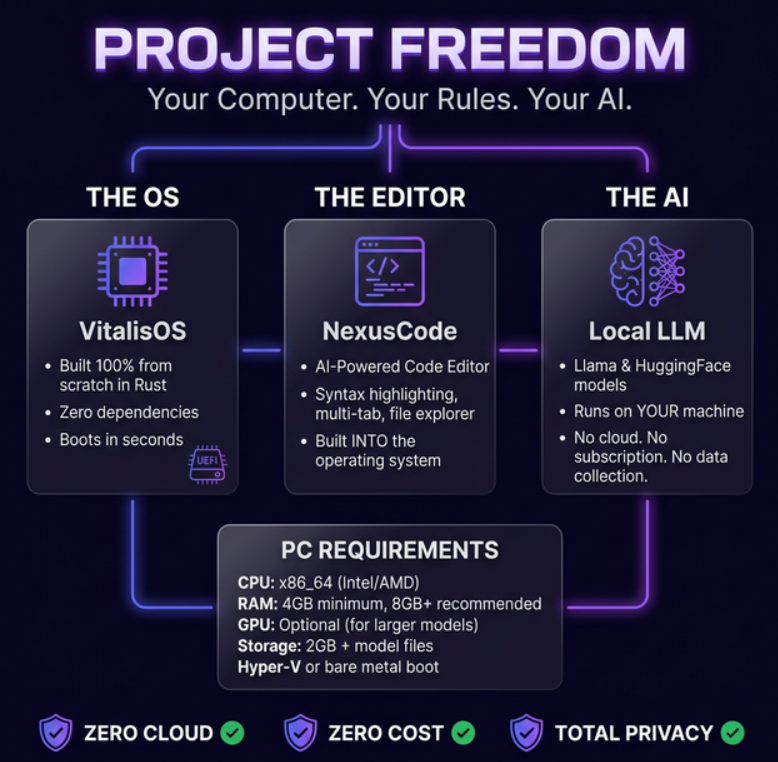
Project Freedom
A complete graphical operating system built from scratch in Rust #![no_std]. Zero dependencies, zero crates. From the UEFI boot loader to the window compositor to the SHA-256 authentication.
The OS Goes Online
The next-generation kernel now speaks to the outside world through its own hardware driver. A from-scratch virtio network driver, an in-kernel TCP/IP stack with DNS, and a built-in text-mode browser that fetched its first real web page — rendered below in a raw framebuffer capture of the running OS. Not a mockup.

virtio-net Driver
A network card driver written from scratch: PCI bus enumeration, BAR0 I/O mapping, feature negotiation, split virtqueues (256 descriptors RX/TX) in dedicated DMA memory.
In-Kernel TCP/IP + DNS
A full IPv4 TCP/IP stack with DNS resolution running inside the kernel — TCP, UDP and ICMP sockets polled straight from the OS main loop.
Text-Mode Browser
URL bar, non-blocking HTTP/1.0 client and HTML-to-text rendering. It fetched its first real web page live over the OS's own network stack.
Start Menu + Live Dock
App launcher with keyboard navigation (F1, arrows, digit shortcuts), frosted-glass desktop, and a dock pill showing live link state and IP address.
System Overview
14-Step Boot Sequence
The kernel boots through a precisely ordered sequence. UEFI firmware loads the binary, efi_main() configures hardware, exits Boot Services, and launches the graphical desktop entirely on bare-metal.
Desktop Environment
A complete graphical desktop rendered directly to the GOP framebuffer. No X11, no Wayland—the kernel itself manages windows, compositing, input routing, and rendering.
NexusCode IDE
Full-featured code editor with multi-tab support, .sl syntax highlighting, AI chat panel, command palette, and split view. 1,121 LOC — the largest kernel module.
Window Compositor
Z-ordered rendering pipeline: desktop background → application windows → taskbar → mouse cursor. Proper layering with transparency support.
Virtual Terminals
8 virtual terminals (F1–F8) each with independent shell instances. Switch between graphical desktop and terminal sessions instantly.
File Browser
Two-pane directory navigator with file preview, keyboard navigation, and support for the VFS/ramfs filesystem. Create, rename, and delete files.
Modal Text Editor
Vim-inspired modal editor with normal and insert modes. Syntax highlighting for .sl files, clipboard operations, line numbering.
Graphical Login
SHA-256 password authentication with a graphical login screen. Secure session management — no plaintext passwords stored anywhere.
Task Manager
Real-time system monitoring: memory usage, CPU load, running process list, kill capability. All rendered directly to framebuffer.
Matrix Boot Animation
Cinematic Matrix-style digital rain during boot, followed by Linux-style system initialization messages showing each subsystem coming online.
System Architecture
Kernel Code Samples
// UEFI application — boots the OS from firmware
#![no_std]
#![no_main]

#[export_name = "efi_main"]
pub extern "efiapi" fn efi_main(
    handle: EfiHandle,
    st: *mut EfiSystemTable,
) -> EfiStatus {
    serial::init();
    // Locate GOP, get memory map, exit Boot Services
    // Switch to 64KB kernel stack via trampoline
    // Enter kernel_stage2() — now bare-metal
}// Compositor rendering pipeline
pub fn render_frame(
fb: &mut Framebuffer,
desktop: &Desktop,
wm: &WindowManager,
taskbar: &Taskbar,
mouse: (i32, i32),
) {
desktop.draw_background(fb); // Layer 0
wm.draw_windows(fb); // Layer 1
taskbar.draw(fb); // Layer 2
draw_cursor(fb, mouse); // Layer 3
}// Graphical login with SHA-256 password hashing
pub fn verify_password(
input: &[u8],
stored_hash: &[u8; 32],
) -> bool {
let hash = crypto_hash::sha256(input);
// Constant-time comparison
let mut diff = 0u8;
for i in 0..32 {
diff |= hash[i] ^ stored_hash[i];
}
diff == 0
}// 4-level x86_64 page tables
pub fn map_page(
pml4: &mut PageTable,
virt: u64,
phys: u64,
flags: PageFlags,
) {
let p4 = (virt >> 39) & 0x1FF;
let p3 = (virt >> 0x1FF;
let p2 = (virt >> 0x1FF;
let p1 = (virt >> 0x1FF;
// Walk/create PDP → PD → PT entries
}Full Module Inventory
| Module | LOC | Purpose |
|---|---|---|
| nexus_code.rs | 1,121 | NexusCode IDE — multi-tab editor, syntax highlighting, AI chat panel, command palette |
| editor.rs | 624 | Modal text editor — normal/insert modes, .sl syntax highlighting, clipboard |
| shell.rs | 600 | Terminal shell — command parsing, history, pipe support, built-in commands |
| framebuffer.rs | 501 | GOP framebuffer — pixel rendering, font rasterizer, double buffering |
| main.rs | 501 | UEFI entry point — 14-step boot sequence, GDT/IDT/PMM init, stage2 trampoline |
| idt.rs | 443 | Interrupt descriptor table — 32 exceptions + 16 IRQs, PIC remapping, handlers |
| window.rs | 420 | Window manager — z-ordering, drag, resize, maximize/minimize, focus tracking |
| file_browser.rs | 361 | Two-pane file navigator — directory tree, file preview, keyboard shortcuts |
| uefi.rs | 307 | UEFI protocol handling — GOP locate, memory map, boot services exit |
| desktop.rs | 295 | Desktop environment — virtual terminals (F1–F8), wallpaper, Project Freedom branding |
| vmm.rs | 256 | Virtual memory manager — 4-level page tables, identity mapping, page fault handling |
| vfs.rs | 252 | Virtual filesystem layer — mount points, path resolution, unified API |
| boot_anim.rs | 242 | Boot animation — Matrix-style rain effect, Linux-style system status checks |
| ramfs.rs | 239 | RAM filesystem — in-memory inode tree, read/write/mkdir/delete operations |
| keyboard.rs | 238 | PS/2 keyboard driver — IRQ1 handler, scancode decoding, US layout, modifiers |
| arch.rs | 227 | x86_64 architecture — port I/O, MSR access, CPUID, control registers |
| login.rs | 225 | Graphical login screen — SHA-256 password verification, user session management |
| mouse.rs | 224 | PS/2 mouse driver — IRQ12 handler, packet decoding, cursor tracking |
| task_manager.rs | 197 | Task manager — real-time memory/CPU display, process list, kill support |
| pmm.rs | 179 | Physical memory manager — bitmap allocator, UEFI memory map integration |
| compositor.rs | 176 | Window compositor — z-ordered rendering: desktop → windows → taskbar → cursor |
| gdt.rs | 172 | Global descriptor table — kernel/user code+data segments, TSS for ring transitions |
| sysinfo.rs | 156 | System information — CPUID brand string, memory stats, uptime tracking |
| input.rs | 139 | Unified input layer — key event queue, mouse state aggregation |
| crypto_hash.rs | 135 | SHA-256 implementation — pure Rust, no dependencies, used for login auth |
| heap.rs | 131 | Heap allocator — 16 MiB arena, GlobalAlloc trait, bump + free-list |
| serial.rs | 127 | Serial COM1 driver — 115200 baud, 8N1, debug output over UART |
| timer.rs | 108 | PIT timer — 1000 Hz tick, IRQ0 handler, uptime counter |
| taskbar.rs | 95 | Taskbar UI — window buttons, clock display, system tray |
| start_menu.rs | 86 | Start menu — application launcher, system shortcuts |
Systems Programming Research Frontier
Freedom OS sits at the intersection of questions engineers are actively researching: where bare-metal systems programming is heading, why memory-safe languages are displacing C/C++ in kernels, and how zero-dependency engineering forces a deeper understanding of the hardware.
Future of Bare-Metal Systems Programming
Memory-safe languages are replacing C/C++ at the kernel level. Rust's ownership model plus zero-cost abstractions make #![no_std] development viable for production-grade operating systems — not just research toys.
Explore Full Architecture →Rust OS Development Roadmap
From UEFI bootloader to GUI desktop: the same ownership and borrow-checking discipline that prevents data races in application code scales down to interrupt handlers, page tables, and device drivers.
See the Compiler + Formal Stack →Zero-Dependency Software Engineering
Every kernel module here — SHA-256, TCP/IP, the window compositor — is written without external crates. That discipline forces a deeper understanding of what the hardware and the language actually guarantee.
Compare Against the LLM Training Engine →Memory-Safe Kernel Design
4-level page tables, a bump+free-list heap allocator, and a physical memory bitmap — all implemented without a single unsafe memory corruption bug reaching the desktop layer.
Read the System Design Lens →Frequently Asked Questions
Short, direct answers structured for both human scanning and answer-engine extraction.
What is Freedom OS?
Freedom OS is a bare-metal x86_64 operating system built from scratch in Rust with zero external dependencies: 30 kernel modules, UEFI boot, memory management, a GUI desktop with window compositor, and the integrated NexusCode IDE.
What programming language is Freedom OS written in?
Rust, compiled with #![no_std] and #![no_main] — running directly on bare-metal x86_64 hardware with no existing kernel, no libc, and zero external crates.
Does Freedom OS have networking?
Yes — a from-scratch virtio-net driver, an in-kernel TCP/IP stack with DNS resolution, and a text-mode browser that fetches real web pages over the OS's own network stack.
Is Freedom OS open source?
Yes — Freedom OS is MIT licensed and published on GitHub at github.com/ModernOps888/freedom.
Does Freedom OS have a graphical desktop?
Yes — it ships a full GUI desktop environment with a window compositor, taskbar, start menu, file browser, task manager, and the built-in NexusCode IDE, all implemented in Rust as part of the kernel project.
How does Freedom OS boot without an existing OS?
UEFI firmware loads the kernel binary directly, which locates the GOP framebuffer and memory map, exits UEFI Boot Services, and takes over the CPU completely — setting up its own GDT, IDT, page tables, and heap before ever drawing a pixel.
Built an OS From Scratch, Zero Dependencies. Hire the Engineer.
Bare-metal systems programming, kernel development, Rust performance engineering, and network stack design — consulting from someone who's built it all from scratch, not just talked about it.
⚡Get in Touch